
Beyond Conversation: Teaching LLMs to Call Functions for Agentic Tasks
Hands-on experience of building dataset for training LLMs to use tools

Large language models (LLMs) like ChatGPT can follow instructions because they’ve been trained to do just that. The training process usually happens in three main steps.
DISCLAIMER: This blogpost is based on my experiences as part of Bielik team - Polish Large Language Model (https://huggingface.co/speakleash/Bielik-11B-v2.3-Instruct)
First, the model learns how language works—how words, sentences, and ideas fit together. This is called the base training. It doesn’t yet know how to follow instructions, but it gets really good at understanding and generating human-like text.
Next comes instruction tuning. Here, the model is shown lots of examples where someone gives an instruction, and the model learns to respond helpfully. Because it already understands language well from the first phase, it can start generalizing to new instructions it hasn’t seen before.
After that, there are more advanced training techniques to make the model’s responses even more useful, accurate, and polished.
Now, if we want to build something more powerful—like an AI Agent that can do things for you, such as searching the internet or booking a calendar event—we need to teach the model how to use tools.
Think of a tool as a piece of software that performs a task. Just like humans use apps, LLMs can use tools by calling functions—little blocks of code with parameters that tell the tool exactly what to do.
Let’s say you want to search the web. A developer would create a function like search(query), where the “query” is what you want to look up, like "newest Booker nominations". From the model’s point of view, this is how it “uses Google.”
But here’s the tricky part: the model needs to learn how to recognize that your instruction—“Find the latest Booker Prize nominees”—should trigger that search() function, and it also needs to know how to fill in the right parameter in this case - "latest Booker Prize nominees'.
That’s why we create special datasets that teach the model how to use these tools. We give it lots of examples showing which function to use and how to fill in the blanks, so it can learn to use tools just as naturally as it learns to chat.
How I Created a Dataset to Teach Model to Use Functions
When I started learning how to train language models to use functions (also called function calling), I realized something surprising: even though there’s a lot of research out there, it’s hard to find clear, step-by-step explanations of how people actually do it. There are hints and examples, but no universal guide. So, you often have to figure out your own path.
That said, there are some key steps most people follow when training a model to use functions.
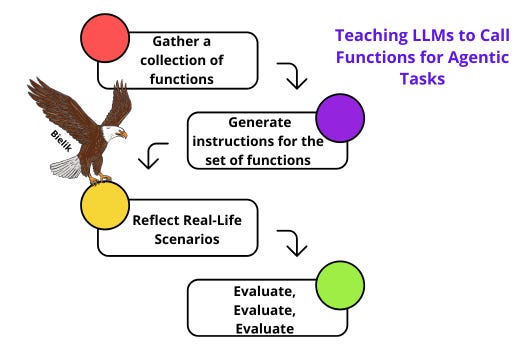
1. Gather a collection of functions
To start, you need a list of functions the model can use—these are like the tools it will learn to work with. It’s even better if you can actually run these functions on your computer, so you can test whether the model is using them correctly later on.
Getting a good collection isn’t easy, especially in languages other than English. For example, I looked into using the RapidAPI dataset, but I found it frustrating—many function descriptions were unclear or poorly written. That matters a lot, because the model learns how and when to use a function based on its description.
Eventually, I found a high-quality set of open-source functions from a project called Argilla. These came with clear descriptions, which made them much more useful. I translated them into Polish, even though translating automatically can introduce grammar issues. Still, it worked well enough—and having imperfect data can actually help the model become more flexible.
2. Create instructions for a collection of functions
Once you have your functions, you need to create instructions that the model can learn from. Since I had about 40,000 functions, I needed hundreds of thousands of instructions. So instead of writing them manually, I used another language model to generate them.
The idea was to ask the model to create natural instructions based on the function descriptions. For example, if we have a function like this:
Tool: search
Description: Search for information on the web
Parameter: query – what you want to search for
I’d prompt the model with (veeery simplified version):
“Create an instruction that would lead someone to use this tool. Then show the tool with the correct parameter filled in.”
And it might respond with:
Instruction: “I want to look for Booker Prize nominations for 2025—could you search the web for me?”
Function call: search(query="booker nominations 2025")
That’s great—but now imagine we need 12 different instructions for each function to reach our goal of 500,000 instructions. The challenge is making sure the instructions are diverse, because language models tend to give similar answers if you ask them the same thing repeatedly. That variety is key to training a model that understands and uses tools well.
Using Personas to Make Instructions More Diverse
To help our model learn better, we introduced something called Personas. This means we asked the model creating the instructions to pretend to be different types of people. By doing this, we made sure the training data was more varied and realistic—because real people ask for things in all sorts of different ways.
For example, instead of having every instruction sound the same, we told the model to generate some as if written by a bohemian artist, and others as if written by a local priest. Here’s how that changes things:
Priest: “Tomorrow I have a big sermon and I want to make sure I have all the facts. Could you check the last time the Pope visited Poland?”
Boho artist: “I want to spend part of my summer listening to music outside. What concerts are planned in August around Warsaw?”
Even though these instructions might connect to similar tools (like searching the web), they reflect different voices and contexts. That variety makes a huge difference when training a model that’s supposed to understand a wide range of people.
3. Making Sure the Dataset Reflects Real-Life Scenarios
Once you’ve gathered a large enough collection of functions, the next big challenge is making sure the training data shows a wide variety of situations. People ask for things in many different ways, and the model needs to learn how to handle all of them. That means the dataset should include examples of many different types of interactions with tools.
This part is tricky. Ideally, you'd learn what real users expect by testing the model directly—but that only happens after training. So instead, I took a deep dive into existing research to understand how people typically interact with tools in real use cases.
One helpful resource was the BFCL (Berkeley Function Calling) dataset, which includes a thoughtful mix of scenarios. Inspired by their approach, I made sure to include similar types of examples (no cheating and overfitting - it was a loose inspiration to get me started), such as:
Instructions that have a clear matching tool in the collection
Instructions that involve using multiple tools at once
Cases where the model must choose between similar tools, like telling the difference between
"insert_record"and"update_record"Situations where the user asks for something, but no tool is needed, and the model should recognize that
By covering a wide range of realistic scenarios, we give the model the best chance of learning how to respond accurately, flexibly, and helpfully—no matter how people ask for help.
Wrapping Up
Thanks to this approach, we were able to generate hundreds of thousands of training examples. But quantity alone isn’t enough—quality is absolutely critical. That’s why the entire dataset went through a careful and thorough verification process to ensure everything was accurate and useful, even at a large scale.
I’ll dive into how that quality-checking pipeline worked in the next article.